

Check my plans, free

How it works

From the PDF plan set you send to the files you check, price and bid from — step by step, with one sample project run start to finish.

How it works

Three steps. No account, no sales call.

Your files stay on your device until you order.

  1. A contractor dropping a plan set into the analyzer, rolled drawings on the desk
    1

    Drop your drawings

    Your PDF plan set (the matching DWG/DXF is optional). Sheets are counted in your browser.

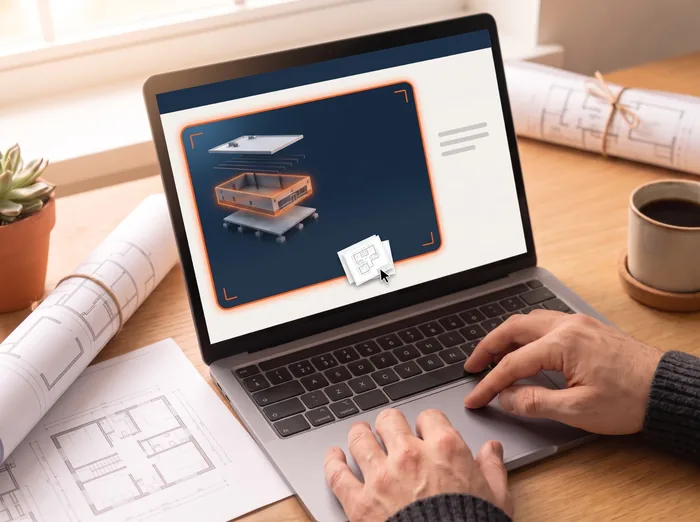
  2. Card in hand at the laptop, the flat fee on screen, before paying
    2

    Lock the fee and pay

    See your flat fee, choose quantities only or with reference rates, then pay. Only now do files leave your device.

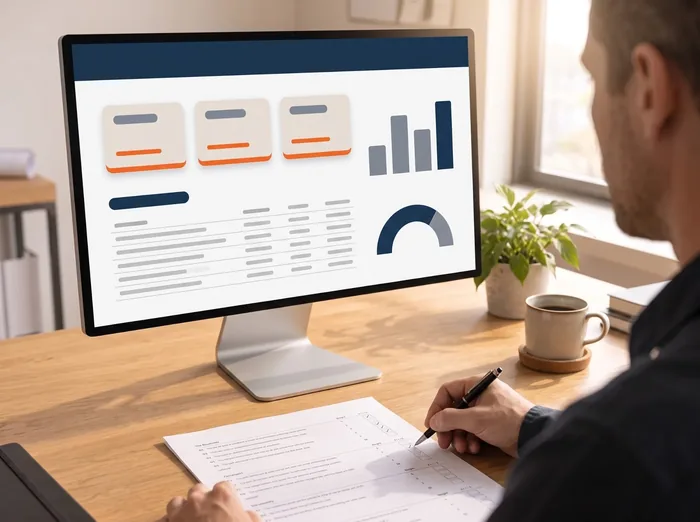
  3. The delivered Project Overview open on screen and a printed page being checked at the desk
    3

    Open the ZIP

    Every measured quantity traced to a sheet, graded, with its calculation (a lump sum or allowance says so on its line), and placed in a schematic Quantity Model for checking. The README says what to open first.

Fully automatedNo estimator reviews your numbers — read and measured by AI.
A package that fails our safety checks is never sent — you are refunded.
  1. Scanseconds
  2. Measureautomated
  3. Gradeevery line
  4. QA checkstops a bad package
Quantity Model · whenever the takeoff records where its lines were measured

Quantity Model — check the takeoff, piece by piece.

A schematic model built from our own measurements, so you can see what was counted and where. Tap a wall, a door, a slab or a run to see its quantities, where each dimension came from and the calculation rows it feeds; tap a calculation row to see the parts it measures. It is a checking tool, not a design model or a rendering: shapes are simplified, and the drawings govern every dimension. Where it cannot be built, the README says why.

Schematic — for checking quantities only. Not a design model; not for dimensions.

  • 289 of 322 parts drawn from the drawings, each exactly once
  • 33 listed but not drawn, never guessed into place
  • 92% of calculation rows tied to a part of the model
Open full screen ↗
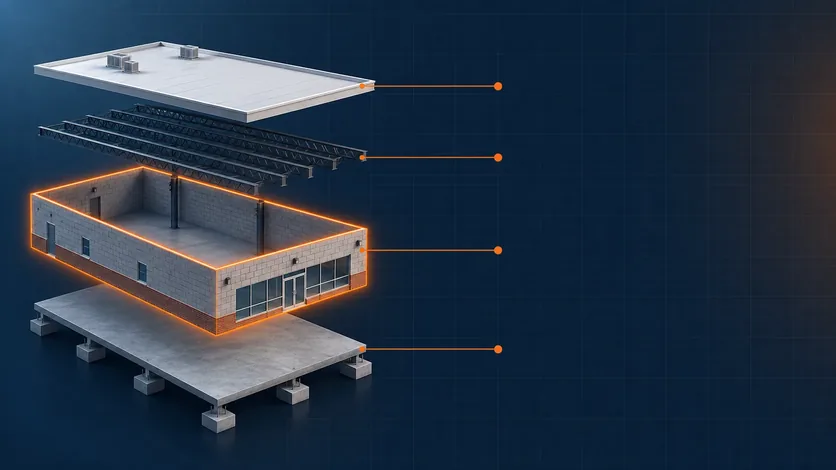
The sample hall pulled apart into its four layers: pad footings under the slab, the walls with the face brick outlined, the steel joists, and the roof
  1. 1 · Footings and slabPad footing F1 · 15 EASlab on grade, 5 in · 3,200 SF
  2. 2 · Walls8 in CMU walls · 2,762 SFFace brick, net of openings · 726.67 SF
  3. 3 · Roof structureSteel joists 24K7 · 15 EA
  4. 4 · RoofMetal roof deck, R-30 insulation, TPO roof · 3,200 SF each
Measured from the footings up, the order a takeoff is built in. An illustration of our sample hall: the figures are its measured quantities, not counted from the picture.

Included in both takeoff packs at no extra cost — one offline .html file that opens in your browser, no login. The Quantity Model is schematic, made for checking quantities: it is not a design model or an as-built record, and the drawings govern every dimension.

One sample project, start to finish

A plan set goes in. A takeoff you can check comes out.

A 3,200 SF community hall — a fictional building we drew, measured and published. Every quantity here came out of the same pipeline your set goes through. Every price in the sample is an illustrative figure invented for the demonstration, and every file says so on every page. A real order is different: quantities only, or — if you choose them before paying — published reference rates on the lines our sources cover.

An estimator at a desk of drawings in the evening, the sample Pricing Studio open on the laptop PRICING STUDIO · SAMPLE OUTPUT
Your rates on our quantities — the quote builds as you type.OFFLINE · NO LOGIN
16drawing sheets read
6trades found
90lines, each graded
$0to see your fee
How the set went through
  1. 1

    16 sheets read in the browser

    Title blocks found on every page. The cover and the general-notes sheet are read free, so the fee is set on the other 14. Fee shown and locked before anything is uploaded.

  2. 2

    90 quantities, each traced to its sheet

    The calculation sits beside every line, graded with its reason. Where a sheet could not answer, the line says SOURCE INSUFFICIENT.

  3. 3

    Priced in the Studio — with your numbers

    The Project Overview gives cost as a range, never a single guess. In the Pricing Studio you type your own rates — over our reference rates if you chose them — and print the proposal on your letterhead.

What came out — the Project Overview, sample hall illustrative figures
Priced so far — the sum of 82 priced lines, not a forecast$879,807
Duration3.3 – 6.7 months
Peak cash — from the sample's payment schedule$353,986

The sample is our own drawn set, priced at invented illustrative rates on 82 of 90 lines to show the tools working — not a market price and not a quote. A real order carries prices only if you choose reference rates: published rates on the lines our sources cover, so it prices fewer lines and leaves the rest blank for you.

Two tools in your browser · offline · no login

Not a PDF you read. Files you work in.

Both open from the ZIP on your own computer. Nothing you type leaves it — we keep no copy.

Pricing Studio overview: how the quote is built up, material against labor by trade, the ten lines that carry most of the value, and a what-if slider
In the Full Draft Takeoff Pack

Pricing Studio. Your prices on our quantities.

  • Type your costs line by line, or one sub-quote for a whole trade — totals follow as you type
  • A rate check on every line — a cost far outside our reference band is flagged before it reaches your quote
  • See where the money is — cost build-up, the ten lines that carry the value, a what-if slider for margin and waste
  • Print your proposal on your letterhead, and write your prices into the Excel workbook
Inside the sample Studio
Six trade tabsthree lines each in the sample; your package carries every measured line18 lines

Site costs, markup & taxyour overheads and margin, each on its own tab2 tabs
Your Excel and the proposalwrite your prices into the workbook, print the quoteoffline
Maple Street Community Hall sample. The costs in it are illustrative figures invented for the demonstration — type over any of them. On an order the cells start blank, or with published reference rates if you chose them.

Try the sample Studio Three lines a trade, priced at illustrative figures you can type over.

Project Overview, Bid / No-Bid tab: the score on a gauge with the verdict band, the readiness sheet and the scorecard
In every Full Draft Takeoff Pack

Project Overview. Should you bid?

  • Cost, duration and peak cash as ranges from your own set — SOURCE INSUFFICIENT where a sheet cannot answer
  • Bid / No-Bid scored live — the lines your drawings settle are answered with the evidence; score the rest and watch the verdict move
  • The questions for your designer, worked as sent and answered, copied into an email in one click
  • Print to PDF, save an editable Word copy, and write your scores into the scorecard workbook
What the sample hall's Overview prints
Priced so far82 of 90 measured lines carry a rate; the eight without one are not in it$879,807
Durationone method only, so nothing cross-checks it — the band is that method's own planning range3.3 – 6.7 months
Peak cash to carryaround month 1 of 6, from the workbook's own payment schedule — site work and structure, 43% of the work, are paid out before the first pay application is paid$353,986
Maple Street Community Hall — a fictional building, priced at illustrative rates invented for the demonstration. Not a bid, not an estimate, not a price for anything. An order's Overview prices only the lines that carry a rate — your reference rates, if you chose them.

Open the sample Overview Score it yourself; the gauge moves as you answer.

Works with the software you already use

Open it in Bluebeam Revu. Check it where you already work.

Each measured quantity is a live markup in Bluebeam Revu, with its line ID and figure in the Markups List, so you can check our takeoff in the software you already use and keep working from it.

No Revu? The same quantities open in Excel and in any web browser. The workbook opens in Excel; the Pricing Studio, the Project Overview and Where We Measured open offline in any browser.

  1. 01
    Open Marked-up Plans.pdf in Revu

    Each quantity is a markup on the sheet it was measured from, with its line ID, item, quantity and unit in the Markups List.

  2. 02
    Import our columns and tool set

    DraftTakeoff-Columns.xml and a Tool Chest file (.btx) come in every package at no extra cost, for the same columns in your own Revu files.

  3. 03
    Check a markup, or change it

    Move a length or area, or change its depth, and Revu measures it again in the Measured Qty column. The Qty column keeps the workbook figure.

  4. 04
    Export Revu's own Markup Summary

    Revu's own Markup Summary matches the workbook line for line. 763 of 763 lines across three test packages

  5. 05
    Compare with your original sheet

    Revu's Compare Documents shows the marked-up sheets match your original drawings: the markups sit on them, unchanged. 0 differences on 77 sheets across two jobs

  • Measured againlengths and areas you move or deepen, in Revu's Measured Qty column
  • Line for lineRevu's own Markup Summary against our workbook763 of 763 lines across three test packages
  • Unchangedyour drawings under our markups, by Revu's Compare Documents0 differences on 77 sheets across two jobs
  • $0for the Columns.xml and Tool Chest files, in every package

Checked in Bluebeam Revu 21 on Windows. Bluebeam and Revu are trademarks of Bluebeam, Inc. DraftTakeoff is not affiliated with Bluebeam.

Before your next bid

Your quantities, measured — before your next bid.

Drop the set now. Your browser counts the sheets and shows the fee in seconds — nothing is uploaded, nothing to sign up for.

from $199 · flat fee, locked48 hours · 24 h with RushLate? Full refund
What happens next
  1. 01Seconds — sheets counted on your device, fee shown and locked.
  2. 02One choice — quantities only, or add reference rates (Beta: $0 now, +$60–$350 from 2027). Priced before you pay.
  3. 0348 hours — a link to your ZIP lands in your inbox. Open the README first.

No account. No sales call. If we miss the date, the money goes back automatically.